

MeroShare Workflow
MeroShare bulk apply with explicit confirmation
Lagani Saathi keeps live MeroShare automation behind a clear confirmation step. You choose the IPO, FPO, or right-share issue, select accounts, and authorize what the app may access.
Video walkthrough
MeroShare bulk apply in action
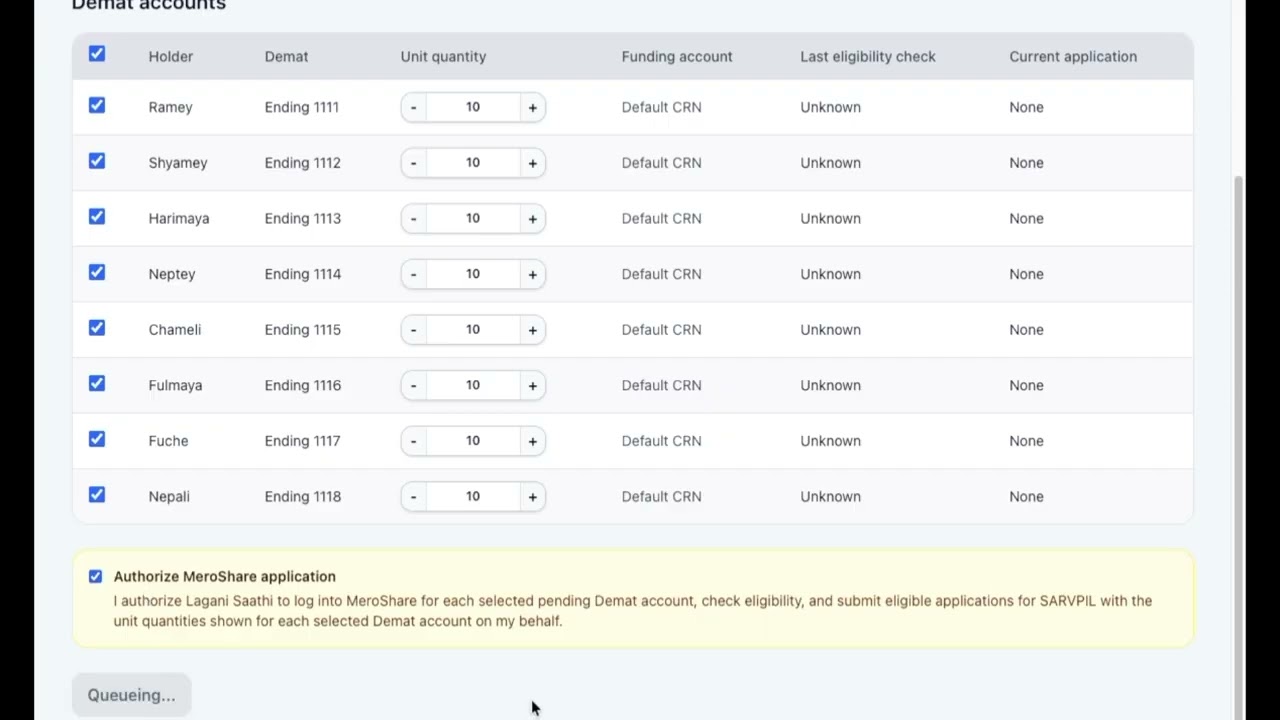
Watch how Lagani Saathi selects Demat accounts, confirms intent, and submits eligible MeroShare applications with an audit trail.
IPO, FPO, and right-share windows
Bulk Apply works across public share issues, so the same confirmation-gated workflow covers IPOs, FPOs, and right shares.
Confirmation-gated automation
Bulk Apply CTAs lead to review and confirmation screens before any live MeroShare work is queued.
Eligibility-aware sessions
Each selected account can be checked for issue availability, bank details, quantity rules, and submission result.
Redacted audit trail
Application outcomes are recorded without logging passwords, CRN numbers, PINs, or full Demat numbers.
Stay ready
Get issue alerts or share this guide.
Subscribe for IPO and right-share alerts, or send Lagani Saathi to someone who manages family Demat accounts.
FAQ
Common questions
Does Lagani Saathi automatically apply without permission? + -
No. Live submissions require explicit group-scoped confirmation or individual approval.
Which MeroShare data is used? + -
Only the access needed for the authorized operation, such as login, issue lookup, eligibility details, bank metadata, submission, and logout.
Related guides
Keep exploring the Nepal share workflow.
These public pages explain the connected parts of the Lagani Saathi workflow without exposing private app data.